How to Find the Perfect Stock Photo With a Sentence — Not Keywords
Four real searches — a lifelong café regular, loneliness in a crowd, a pure metaphor, and one query in two languages — where describing the scene beats every keyword box.
 Marouane Tijani
9 min read
Marouane Tijani
9 min read

You can picture the photo perfectly. Warm morning light. A weathered face. A small cup, a quiet street,
the unmistakable sense that this person has done this a thousand times. So you open a stock photo site,
and immediately you have to betray the picture in your head and shrink it into keywords a search box will
tolerate: old man, café, coffee. The results come back stiff, generic, wrong.
This is the central frustration of finding images, and it has nothing to do with how many photos exist. It's about how you're allowed to ask for them. Let's fix that — and then prove it four times.
Why keyword search fails you
Traditional stock search — the kind behind most photo libraries, and behind Google Images' text box — is a tag-matching system. Every photo carries words a human or an algorithm attached to it: man, table, coffee, outdoor. When you search, the engine compares your words to those words and ranks by overlap. That model breaks in three predictable ways:
- The vocabulary gap. You say “café,” the tag says “coffee shop.” You say “elderly,” the tag says “senior.” Same meaning, different words — a tag matcher misses it.
- The intent gap. Your query has a mood — routine, solitude, three decades of habit. No tag captures that, so the engine throws the idea away and keeps only the nouns.
- The long-query penalty. The more you describe, the worse keyword search performs, because every extra word is one more thing the tags probably don't contain. So you're trained to dumb your query down.
What semantic image search actually is
Semantic image search finds images by meaning rather than by matching tag words. An AI model converts your query — and every image in the index — into a numerical fingerprint (a vector) that captures what the thing is about. The engine then returns the images whose fingerprints sit closest to your query's. Because the comparison happens in “meaning space,” a description can match a photo that was never tagged with any of your words.
Two consequences fall out of that, and they're the whole point:
- You search in plain, natural language — a full sentence, the way you'd describe the scene to a friend.
- Longer, richer queries get better, not worse. Every extra detail sharpens the fingerprint instead of starving the match.
The test: one deliberately impossible sentence
To make the difference concrete, we picked a query no keyword system could survive — too long, too specific, carrying a story rather than a list of objects:
“An old man sitting at a café table he has visited every morning for thirty years.”
In a keyword box, one of two things happens: it strips the sentence to old, man,
café and returns a wall of generic stock — or it takes the string literally, finds nothing
tagged that way, and returns almost nothing. The thirty years, the every morning, the
quiet weight of routine — all discarded. Here's what Pexafy returned for that exact sentence, untouched:


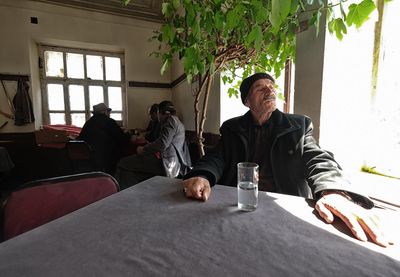



Look at the first result: an older man, alone, at an outdoor café table, caught in exactly the habitual morning calm the sentence described. Nobody tagged that photo with “thirty years.” The engine understood what the sentence meant and found the feeling. Once is luck. So let's do it three more times.
Three more searches that break keyword engines
1 · An emotion with no object: “loneliness in a crowded city”
There is no “loneliness” tag. A keyword engine sees only city and crowd and hands
you postcards. Pexafy reads the feeling — a single still figure inside a blur of strangers:



2 · A pure metaphor: “the weight of carrying everyone's expectations”
This sentence contains no photographable object at all. A tag matcher is helpless. Pexafy resolves the metaphor into its most literal, human form — people physically bearing enormous loads:



Emotion, metaphor, narrative — three different kinds of “impossible,” three sets of genuinely fitting photos. There's one more capability that quietly changes who can use stock photography at all.
3 · The same search, in any language
Keyword search is only as good as the language the tags were written in — overwhelmingly English. Pexafy maps meaning into the same space no matter the language, so the query lands in the same place whether you type it in English or French. Watch what happens when we search for a fisherman two ways:



Same two photos at the top, in both languages. Not a translated keyword list — the same understanding, reached from French and English alike. Pexafy works this way in 100+ languages, over the same single index.
How this compares to Google Images, Unsplash & Pexels
To be clear: Unsplash, Pexels and Pixabay host beautiful, genuinely free-to-use photography — Pexafy searches all of them and more. Google Images is unmatched for indexing the open web. The difference isn't the pictures; it's the way you're allowed to ask.
| Keyword / tag search Unsplash · Pexels · Pixabay | Google Images | Pexafy | |
|---|---|---|---|
| Matches on | Tag words | Page text & tags | Visual meaning |
| Full-sentence query | Gets worse | Gets worse | Gets better |
| Emotion & metaphor | Discarded | Discarded | Understood |
| Non-English query | English tags only | Partial | 100+ languages, one index |
| Sources per search | One library | The open web | 9 libraries at once |
| Clear free licensing | Yes | You must check each site | Yes — every result linked to source |
Under the hood, Pexafy reads each photo the way a person would — not by trusting its tags, but by looking at the pixels. A neural network studies the actual content of every image and the meaning of your words, and places both into one shared space. Finding the right photo becomes a matter of finding the images that sit closest to your sentence — across 9 libraries, in under 100 milliseconds.
How to search by sentence: 4 tips
To get the most out of semantic search, unlearn a few keyword habits:
- Describe the scene, don't list nouns. Write “a tired nurse taking a quiet break in a hospital corridor at night,” not “nurse hospital.”
- Add the mood. Words like calm, chaotic, nostalgic, minimal genuinely steer results — they're part of the meaning, not noise.
- Use your own language. No need to translate first. Type the sentence in the language you think in.
- Iterate with words, not filters. Too corporate? Add “candid, natural light, documentary.” Refine by describing, not by clicking.
That's the whole shift: stop translating your idea into keywords a machine tolerates, and just describe the picture you already see. The search was the bottleneck — never the library.